Managing your users
When logged in as administrator, an administration tab appears in the navigation bar. If the tab doesn’t appear, ask another administrator to check that your role is “administrator”.
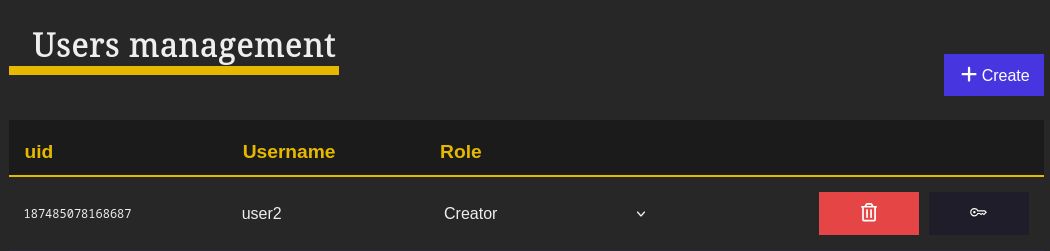
Find the user management tool in the Users tab of your administration interface. It lets you create, modify and delete users.
-
To add a new user, use the “Create” button at the top right of the page.
-
To generate quick login links use the button on the right of each user. The quick login link for this user is copied in the clipboard.
-
To modify the role of a user, use the dropdown on the corresponding line. See the summary tables below for the details of permissions granted by each role (user, creator, manager, administrator).
-
To delete users, use the button of the corresponding line.
User permissions according to their roles
Scene rights
For an authenticated user, the rights on a scene can be (from lowest to highest) :
- none
- read
- write
- administration
The effective rights of a user is the highest among :
- Default access (for connected users) of a scene,
- Individual user rights on a scene,
- Group rights on a scene, if the user is a member of a group.
See the scene page and the scene permissions documentation to edit those rights.
Summary tables
Permissions on scenes
| User role : | Anonymous | User | Creator | Editor | Administrator |
|---|---|---|---|---|---|
| See scene page / View in voyager / Download scene / | According to public access of the scene | According to read scene rights | According to read scene rights | According to read scene rights | ✅ |
| See scene rights | ❌ | According to read scene rights | According to read scene rights | According to read scene rights | ✅ |
| Edit in voyager | ❌ | According to write scene rights | According to write scene rights | According to write scene rights | ✅ |
| Add and remove Tags | ❌ | According to write scene rights | According to write scene rights | According to write scene rights | ✅ |
| Upload files in existing scene | ❌ | According to write scene rights | According to write scene rights | According to write scene rights | ✅ |
| Rename a scene | ❌ | According to administration scene rights | According to administration scene rights | According to administration scene rights | ✅ |
| Access scene history and revert changes | ❌ | According to administration scene rights | According to administration scene rights | According to administration scene rights | ✅ |
| Edit scene access rights | ❌ | According to administration scene rights | According to administration scene rights | According to administration scene rights | ✅ |
| Archive a scene | ❌ | According to administration scene rights | According to administration scene rights | According to administration scene rights | ✅ |
| Restore / Delete archived scene | ❌ | ❌ | ❌ | ❌ | ✅ |
| Create a scene | ❌ | Non | ✅ | ✅ | ✅ |
| Upload files in a new scene | ❌ | Non | ✅ | ✅ | ✅ |
| See tag collection (*) | Filtered according to public access | Filtered according to read scene rights | Filtered according to read scene rights | Filtered according to read scene rights | ✅ |
(*) Collection are visible if at least one of their scenes is visible.
Permissions on user and groups
| User role : | Anonymous | User | Creator | Editor | Administrator |
|---|---|---|---|---|---|
| List Users | ❌ | ❌ | ❌ | ✅ | ✅ |
| Create / Edit / Delete / Connection Link Users | ❌ | ❌ | ❌ | ❌ | ✅* (restricted on its own account) |
| See a group | ❌ | If group member | If group member | ✅ | ✅ |
| List / Create / Add and remove members to Groups | ❌ | ❌ | ❌ | ✅ | ✅ |
| Delete Groups | ❌ | ❌ | ❌ | ❌ | ✅ |
| Get stats and config | ❌ | ❌ | ❌ | ❌ | ✅ |
| Send tests emails / connection email | ❌ | ❌ | ❌ | ❌ | ✅ |